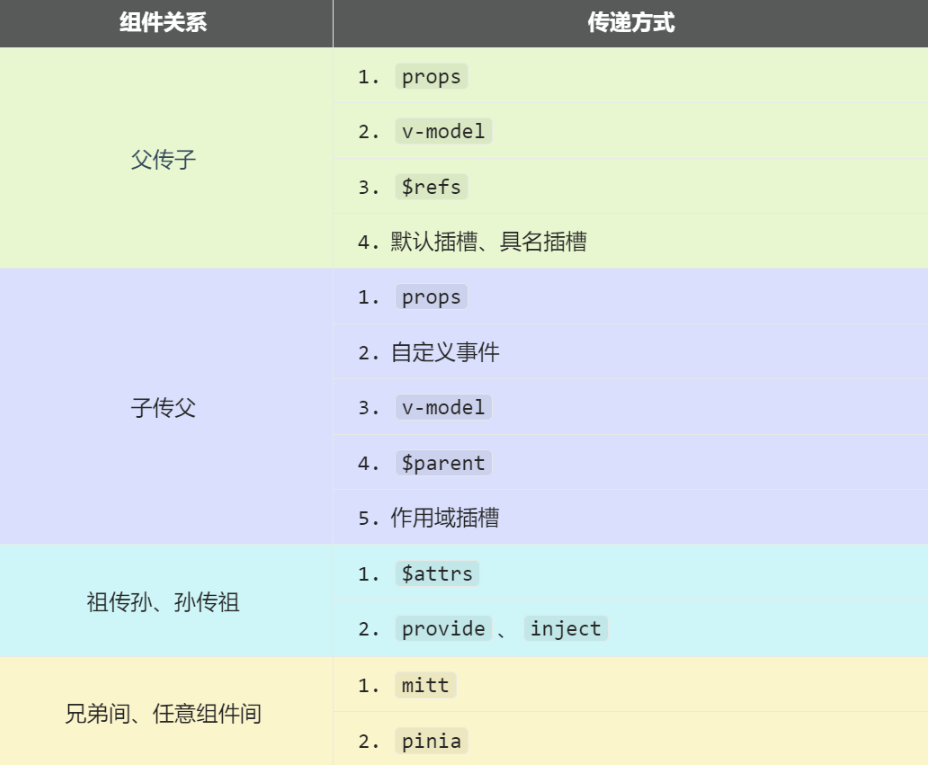
常见通信方式总和
父子相互都能通信 Props父子相互通信 概述:props是使用频率最高的一种通信方式,常用与 :父 ↔ 子 。
若 父传子 :属性值是非函数 。
若 子传父 :属性值是函数 。
注意:props可以让子直接拿到父亲 传过来的属性,儿子使用**defineProps([父亲方法与属性的数组])**,
但是父亲不可以直接去拿儿子的属性,要要拿要遵循以下步骤
1.自己定义一个有属性的方法,变成绑定事件 传递给儿子组件。
2.儿子组件定义触发事件 ,传入父亲想要的属性
父组件:
1
2
3
4
5
6
7
8
9
10
11
12
13
14
15
16
17
18
19
20
<template> <div class="father"> <h3>父组件,</h3> <h4>我的车:{{ car }}</h4> <h4>儿子给的玩具:{{ toy }}</h4> <Child :car="car" :getToy="getToy"/> </div> </template> <script setup lang="ts" name="Father"> import Child from './Child.vue' import { ref } from "vue"; // 数据 const car = ref('奔驰') const toy = ref() // 方法 function getToy(value:string){ toy.value = value } </script>
子组件:
1
2
3
4
5
6
7
8
9
10
11
12
13
14
15
<template> <div class="child"> <h3>子组件</h3> <h4>我的玩具:{{ toy }}</h4> <h4>父给我的车:{{ car }}</h4> <button @click="getToy(toy)">玩具给父亲</button> </div> </template> <script setup lang="ts" name="Child"> import { ref } from "vue"; const toy = ref('奥特曼') defineProps(['car','getToy']) </script>
v-model父子间相互通信
概述:实现 父↔子 之间相互通信。
前序知识 —— v-model的本质
1
2
3
4
5
6
7
8
9
<!-- 使用v-model指令 --> <input type="text" v-model="userName"> <!-- v-model的本质是下面这行代码 --> <input type="text" :value="userName" @input="userName =(<HTMLInputElement>$event.target).value" >
组件标签上的v-model的本质::moldeValue + update:modelValue事件。
1
2
3
4
5
<!-- 组件标签上使用v-model指令 --> <AtguiguInput v-model="userName"/> <!-- 组件标签上v-model的本质 --> <AtguiguInput :modelValue="userName" @update:model-value="userName = $event"/>
AtguiguInput组件中:
1
2
3
4
5
6
7
8
9
10
11
12
13
14
15
16
17
18
<template> <div class="box"> <!--将接收的value值赋给input元素的value属性,目的是:为了呈现数据 --> <!--给input元素绑定原生input事件,触发input事件时,进而触发update:model-value事件--> <input type="text" :value="modelValue" @input="emit('update:model-value',$event.target.value)" > </div> </template> <script setup lang="ts" name="AtguiguInput"> // 接收props defineProps(['modelValue']) // 声明事件 const emit = defineEmits(['update:model-value']) </script>
也可以更换value,例如改成abc
1
2
3
4
5
<!-- 也可以更换value,例如改成abc--> <AtguiguInput v-model:abc="userName"/> <!-- 上面代码的本质如下 --> <AtguiguInput :abc="userName" @update:abc="userName = $event"/>
AtguiguInput组件中:
1
2
3
4
5
6
7
8
9
10
11
12
13
14
15
16
<template> <div class="box"> <input type="text" :value="abc" @input="emit('update:abc',$event.target.value)" > </div> </template> <script setup lang="ts" name="AtguiguInput"> // 接收props defineProps(['abc']) // 声明事件 const emit = defineEmits(['update:abc']) </script>
如果value可以更换,那么就可以在组件标签上多次使用v-model
1 <AtguiguInput v-model:abc="userName" v-model:xyz="password"/>
父组件
1
2
3
4
5
6
7
8
9
10
11
12
13
14
15
16
17
18
19
20
21
22
23
24
25
26
27
28
29
30
31
32
<template> <div class="father"> <h3>父组件</h3> <h4>{{ username }}</h4> <h4>{{ password }}</h4> <!-- v-model用在html标签上,等价绑定方式 --> <!-- <input type="text" v-model="username"> --> <!-- <input type="text" :value="username" @input="username = (<HTMLInputElement>$event.target).value"> --> <!-- v-model用在组件标签上 --> <!-- elementUI组件上是可以加v-model的,但是自己定义的不能直接加 --> <!-- <el-input></el-input> --> <!-- <AtguiguInput v-model="username"/> --> <!-- <AtguiguInput :modelValue="username" @update:modelValue="username = $event" /> --> <!-- 修改modelValue,简化代码,用v-model进行 --> <AtguiguInput v-model:ming="username" v-model:mima="password"/> </div> </template> <script setup lang="ts" name="Father"> import { ref } from "vue"; import AtguiguInput from './AtguiguInput.vue' // 数据 let username = ref('zhansgan') let password = ref('123456') </script>
子组件
1
2
3
4
5
6
7
8
9
10
11
12
13
14
15
16
17
18
<template> <input type="text" :value="ming" @input="emit('update:ming',(<HTMLInputElement>$event.target).value)" > <br> <input type="text" :value="mima" @input="emit('update:mima',(<HTMLInputElement>$event.target).value)" > </template> <script setup lang="ts" name="AtguiguInput"> defineProps(['ming','mima']) const emit = defineEmits(['update:ming','update:mima']) </script>
$refs与$parent父子通信 1.$refs实现父传子
而且可以,定义一次传给所有儿子
2.$parent实现子传父
多个儿子都可以对同一父亲进行相关的影响
父组件:
1
2
3
4
5
6
7
8
9
10
11
12
13
14
15
16
17
18
19
20
21
22
23
24
25
26
27
28
29
30
31
32
33
34
35
36
37
38
39
40
41
42
43
44
45
46
47
48
49
50
51
52
<template> <div class="father"> <h3>父组件</h3> <h4>房产:{{ house }}</h4> <button @click="changeToy">修改Child1的玩具</button> <button @click="changeComputer">修改Child2的电脑</button> <button @click="getAllChild($refs)">让所有孩子的书变多</button> <Child1 ref="c1"/> <Child2 ref="c2"/> </div> </template> <script setup lang="ts" name="Father"> import Child1 from './Child1.vue' import Child2 from './Child2.vue' import { ref,reactive } from "vue"; let c1 = ref() let c2 = ref() // 注意点:当访问obj.c的时候,底层会自动读取value属性,因为c是在obj这个响应式对象中的 /* let obj = reactive({ a:1, b:2, c:ref(3) }) let x = ref(4) console.log(obj.a) console.log(obj.b) console.log(obj.c) console.log(x) */ // 数据 let house = ref(4) // 方法 function changeToy(){ c1.value.toy = '小猪佩奇' } function changeComputer(){ c2.value.computer = '华为' } //给所有儿子加书 function getAllChild(refs:{[key:string]:any}){ console.log(refs) for (let key in refs){ refs[key].book += 3 } } // 向外部提供数据 defineExpose({house}) </script>
子组件一号:
1
2
3
4
5
6
7
8
9
10
11
12
13
14
15
16
17
18
19
20
21
22
23
24
25
<template> <div class="child1"> <h3>子组件1</h3> <h4>玩具:{{ toy }}</h4> <h4>书籍:{{ book }} 本</h4> <button @click="minusHouse($parent)">干掉父亲的一套房产</button> </div> </template> <script setup lang="ts" name="Child1"> import { ref } from "vue"; // 数据 let toy = ref('奥特曼') let book = ref(3) // 方法 function minusHouse(parent:any){ parent.house -= 1 } // 把数据交给外部 defineExpose({toy,book}) </script>
子组件二号:
1
2
3
4
5
6
7
8
9
10
11
12
13
14
15
16
<template> <div class="child2"> <h3>子组件2</h3> <h4>电脑:{{ computer }}</h4> <h4>书籍:{{ book }} 本</h4> </div> </template> <script setup lang="ts" name="Child2"> import { ref } from "vue"; // 数据 let computer = ref('联想') let book = ref(6) // 把数据交给外部 defineExpose({computer,book}) </script>
任意组件通信 任意组件通信mitt 概述:与消息订阅与发布(pubsub)功能类似,可以实现任意组件间通信。
安装mitt
【第一步】新建文件:src\utils\emitter.ts(一般命名为utils或者tools)
1 2 3 4 5 6 7 8 import mitt from "mitt" ;const emitter = mitt ()export default emitter
【第二步】接收数据的组件中:绑定事件、同时在销毁前解绑事件:
1
2
3
4
5
6
7
8
9
10
11
12
import emitter from "@/utils/emitter" ;import { onUnmounted } from "vue" ;emitter.on ('send-toy' ,(value )=> { console .log ('send-toy事件被触发' ,value) }) onUnmounted (()=> { emitter.off ('send-toy' ) })
【第三步】:提供数据的组件,在合适的时候触发事件
1
2
3
4
5
6
import emitter from "@/utils/emitter" ;function sendToy ( emitter.emit ('send-toy' ,toy.value ) }
pinia任意组件通信 使用pinia也可以实现任意组件通信的效果,具体时搭建store仓库,在main.ts中创建相关的pinia对象,然后写相关的ts文件然后暴露出去,提供给所需的组件们使用。
祖传孙通信 atter实现祖传孙通信 具体说明:$attrs是一个对象,包含所有 父组件传入的标签属性
注意:$attrs会自动排除props中声明的属性(可以认为声明过的 props 被子组件自己“消费”了)
下列父组件用
父组件:需要绑定属性进行传递
1
2
3
4
5
6
7
8
9
10
11
12
13
14
15
16
17
18
19
<template> <div class="father"> <h3>父组件</h3> <Child :a="a" :b="b" :c="c" :d="d" v-bind="{x:100,y:200}" :updateA="updateA"/> </div> </template> <script setup lang="ts" name="Father"> import Child from './Child.vue' import { ref } from "vue"; let a = ref(1) let b = ref(2) let c = ref(3) let d = ref(4) function updateA(value){ a.value = value } </script>
子组件:使用atter接受所有父组件的数据
1
2
3
4
5
6
7
8
9
10
<template> <div class="child"> <h3>子组件</h3> <GrandChild v-bind="$attrs"/> </div> </template> <script setup lang="ts" name="Child"> import GrandChild from './GrandChild.vue' </script>
孙组件:可以直接看出,孙组件可以在经过了父组件的传递后,能够接受到父组件传来的所有属性和方法了
1
2
3
4
5
6
7
8
9
10
11
12
13
14
15
16
<template> <div class="grand-child"> <h3>孙组件</h3> <h4>a:{{ a }}</h4> <h4>b:{{ b }}</h4> <h4>c:{{ c }}</h4> <h4>d:{{ d }}</h4> <h4>x:{{ x }}</h4> <h4>y:{{ y }}</h4> <button @click="updateA(666)">点我更新A</button> </div> </template> <script setup lang="ts" name="GrandChild"> defineProps(['a','b','c','d','x','y','updateA']) </script>
provide、inject实现祖传孙通信 在祖先组件中通过provide配置向后代组件提供数据,在后代组件中通过inject配置来声明接收数据
【第一步】父组件中,使用provide提供数据
1
2
3
4
5
6
7
8
9
10
11
12
13
14
15
16
17
18
19
20
21
22
23
24
25
26
27
28
<template> <div class="father"> <h3>父组件</h3> <h4>资产:{{ money }}</h4> <h4>汽车:{{ car }}</h4> <button @click="money += 1">资产+1</button> <button @click="car.price += 1">汽车价格+1</button> <Child/> </div> </template> <script setup lang="ts" name="Father"> import Child from './Child.vue' import { ref,reactive,provide } from "vue"; // 数据 let money = ref(100) let car = reactive({ brand:'奔驰', price:100 }) // 用于更新money的方法 function updateMoney(value:number){ money.value += value } // 提供数据 provide('moneyContext',{money,updateMoney}) provide('car',car) </script>
【第二步】孙组件中使用inject配置项接受数据。
1
2
3
4
5
6
7
8
9
10
11
12
13
14
15
<template> <div class="grand-child"> <h3>我是孙组件</h3> <h4>资产:{{ money }}</h4> <h4>汽车:{{ car }}</h4> <button @click="updateMoney(6)">点我</button> </div> </template> <script setup lang="ts" name="GrandChild"> import { inject } from 'vue'; // 注入数据 let {money,updateMoney} = inject('moneyContext',{money:0,updateMoney:(x:number)=>{}}) let car = inject('car') </script>
子传父操作 自定义事件祖传父 儿子使用defineEmits传递想要要给父组件的数据,用emit先定义好事件名字
注意: 子触发事件之后会传来数据,过来之后父亲还是要写函数和属性来接收数据。
父组件
1 2 3 4 5 6 7 8 9 10 11 12 13 14 15 16 17 18 19 20 <template > <div class ="father" > <h3 > 父组件</h3 > <h4 v-show ="toy" > 子给的玩具:{{ toy }}</h4 > <Child @send-toy ="saveToy" /> </div > </template > <script setup lang ="ts" name ="Father" > import Child from './Child.vue' import { ref } from "vue" ; let toy = ref ('' ) function saveToy (value:string ){ console .log ('saveToy' ,value) toy.value = value } </script >
子组件
1
2
3
4
5
6
7
8
9
10
11
12
13
14
15
<template> <div class="child"> <h3>子组件</h3> <h4>玩具:{{ toy }}</h4> <button @click="emit('send-toy',toy)">测试</button> </div> </template> <script setup lang="ts" name="Child"> import { ref } from "vue"; // 数据 let toy = ref('奥特曼') // 声明事件 const emit = defineEmits(['send-toy']) </script>
插槽子传父 默认插槽 数据在父组件中给与内容到子组件的插槽位置
1
2
3
4
5
6
7
8
9
10
11
12
13
14
父组件中: <Category title="今日热门游戏"> <ul> <li v-for="g in games" :key="g.id">{{ g.name }}</li> </ul> </Category> 子组件中: <template> <div class="item"> <h3>{{ title }}</h3> <!-- 默认插槽 --> <slot></slot> </div> </template>
具名插槽 父组件可以分别放多个内容不同的插槽进入子组件中(数据在父组件中)
1
2
3
4
5
6
7
8
9
10
11
12
13
14
15
16
17
18
19
父组件中: <Category title="今日热门游戏"> <template v-slot:s1> <ul> <li v-for="g in games" :key="g.id">{{ g.name }}</li> </ul> </template> <template #s2> <a href="">更多</a> </template> </Category> 子组件中: <template> <div class="item"> <h3>{{ title }}</h3> <slot name="s1"></slot> <slot name="s2"></slot> </div> </template>
作用域插槽 数据在子组件中,父组件在子组件定义了绑定事件后,可以用params来调用子组件的内容
1
2
3
4
5
6
7
8
9
10
11
12
13
14
15
16
17
18
19
20
21
22
23
24
25
26
父组件中: <Game v-slot="params"> <!-- <Game v-slot:default="params"> --> <!-- <Game #default="params"> --> <ul> <li v-for="g in params.games" :key="g.id">{{ g.name }}</li> </ul> </Game> 子组件中: <template> <div class="category"> <h2>今日游戏榜单</h2> <slot :games="games" a="哈哈"></slot> </div> </template> <script setup lang="ts" name="Category"> import {reactive} from 'vue' let games = reactive([ {id:'asgdytsa01',name:'英雄联盟'}, {id:'asgdytsa02',name:'王者荣耀'}, {id:'asgdytsa03',name:'红色警戒'}, {id:'asgdytsa04',name:'斗罗大陆'} ]) </script>